
Multi-Agent AI Healthcare Assistant
Smart automation for clinics & patients
A friendly demo that shows how AI can simplify patient registration, appointments, and medical checks — no tech knowledge required.
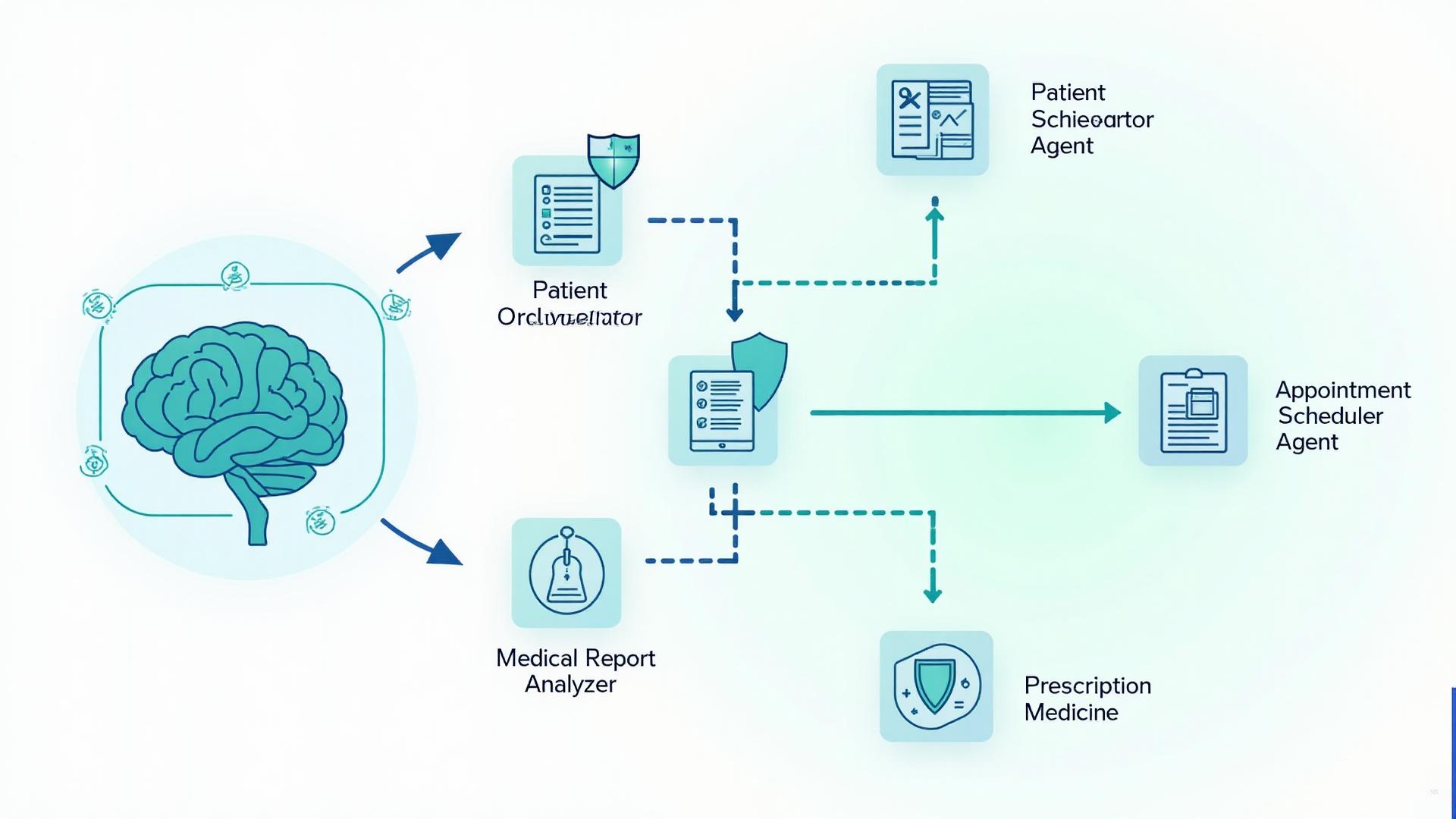
Overview: how our multi-agent system flows — from patient registration to appointment booking and safety checks. Click to view larger.
This demo shows a team of small AI helpers working together to make everyday clinic tasks easier. Think of it like an experienced receptionist, a scheduler, and a medical reviewer — all running automatically to save time and reduce errors.
You don't need to know anything about automation — it works behind the scenes and makes things smoother for staff and patients.
Try It Yourself
See the multi-agent workflow in action with this interactive demo. Watch how AI agents work together to register a patient and book an appointment automatically.
Patient Information
Enter patient details or use sample data to see the workflow in action
AI Agent Workflow
Watch how different AI agents work together automatically
Click "Start Demo" to see the workflow in action
How It Works — Step by Step
Each helper has a specific job, working together like a well-coordinated team.
Main Orchestrator
Traffic controller
This is the brain that decides which helper to call next.
Example: When a patient signs up, the Orchestrator sends them to the Registration helper, then to Scheduling.
Patient Registration Agent
Data collector & checker
Collects patient details and checks they are complete and correct.
Example: It confirms name, contact, and basic health notes — just like a polite receptionist.
Appointment Scheduler Agent
Booking assistant
Finds available doctors and books appointments in a step-by-step way.
Example: It looks for available slots, asks the patient's preferences, and confirms the booking.
Medical Report Analyzer
Document reader
Reads test reports and highlights the important parts for a doctor.
Example: It pulls out key values and flags anything that looks unusual.
Prescription Medicine Analyzer
Safety checker
Checks medicines for interactions or safety issues.
Example: If two drugs might clash, it flags that so the doctor can review.
How This Helps Your Clinic
Save staff time
Routine tasks get automated
Reduce mistakes
Checks happen consistently
Faster patient experience
Less waiting and clearer communication
Better safety
Medicine and report checks add a safety layer
We Can Deliver Your Work Like This
Imagine if your receptionist, scheduler and safety-checker could work together automatically — handling sign-ups, booking appointments and checking medicines — so your staff can focus on care.
We can deliver a step-by-step, tested automation for registration, booking and safety checks.
We'll tailor the workflow to your clinic: change wording, add local forms, connect to your calendar or EHR.
Want a short trial? We can set up a small demo so you can see it working with your data.
We'll build a tailored demo for your clinic and show you exactly how it will save time and reduce errors.
How We Deliver
A simple, straightforward process to get your automation running
Understand
Short call to learn your needs (15–30 minutes).
Build a demo
We create a simple version for your clinic (usually a few days).
Test & launch
You test, we tweak, and then go live.
Common Questions
Do I need to be technical?
No — we handle the technical part and explain everything simply.
Will patient data be safe?
Yes — we use standard best practices to protect data; we can discuss hosting and compliance.
Can the system connect to my existing calendar or EHR?
Usually yes — we'll check what systems you use and connect them.
How long does it take to set up?
A demo can be ready in a few days. Full setup depends on your specific needs, typically 1-2 weeks.
Ready to See It in Action?
We can run a free mini-demo so you can see the workflow with your clinic's sample data.
Technical note: This demo was built as a workflow using multi-agent automation tools — available on request.
Data privacy disclaimer: This is an illustrative demo. All patient information handling follows standard healthcare data protection practices.